Application Mover
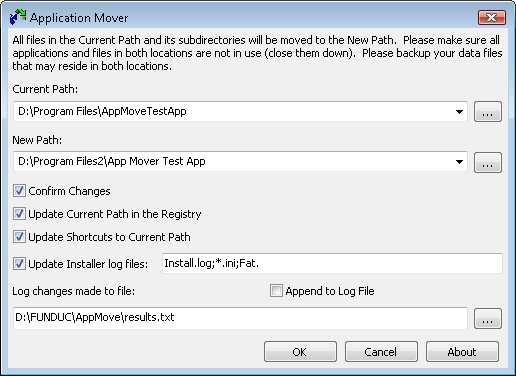
Application Mover is a tool that relocates installed programs from one path to another on your hard disk. Application Mover takes files found in the path specified in the 'Current Path' field (see below) and moves them to the 'New Path' path. Application Mover scans the windows registry for references to files located in the 'Current' field and changes those references to the 'New' path. Application Mover also scans all windows shortcuts in the Start Menu and adjusts path references to the new program location. Finally, *.ini and Install.log files present in the original program path are checked for strings matching the old path location. If found, these strings are changed to the new location. Confirmation dialogs are available if you enable the 'Confirm changes' checkbox (see below). If a file is 'busy' and cannot be changed to the new location, a reboot prompt is offered. Pending changes are then completed after the reboot.
Application Mover is designed to move programs from one path to a different path on the same hard disk or to another hard disk on that same computer. The program works on specify paths (folders). For example, you can move: c:\prog\editor -> c:\oldstuff\edit or to a path on a different drive such d:\rare\editor. Application Mover is not intended to be a clone utility. Technical users can put the program to use in other ways but the standard functioning of Application Mover is that the physical drive arrangement & lettering should remain constant on your machine.
Important Notes: Read through the 'Important Notes' topic (also in the program F1 documentation) for information about the program and usage suggestions. Application Mover must be run 'As Administrator' so you must allow the UAC (User Account Control) prompt when asked after launching the program.
Application Mover is compatible with Vista, Windows 7, Windows 8, & Windows 10. 32-bit and 64-bit (x64) versions are available. You must use the 64-bit version on a 64-bit operating system. Use of the 32-bit version on a 64-bit operating system is NOT supported.
Application Mover Main Dialog

Application Mover Installers
Application_Mover-Demo-Installer-32bit.exe (1.4 MB) - Self-installing version for 32-bit Windows. See Install & Uninstall Information for guidance about installation and removal. Download this to a temporary directory and run 'Application_Mover-Demo-Installer-32bit.exe' to install.
Application_Mover-Demo-Installer-x64.exe (1.7 MB) - Self-installing version for 64-bit Windows. See Install & Uninstall Information for guidance about installation and removal. Download this to a temporary directory and run 'Application_Mover-Demo-Installer-x64.exe' to install.
Additional Information
License Statement - See EULA Statement (End User License Agreement)
Purchase Information - See information on pricing & purchase options.
Purchase Now - https secure online registrations. Note: If you are having trouble with the demo version do not purchase the registered version in the hopes that the registered version will work better on your computer.. Contact support@funduc.com before you purchase.