Funduc Software Touch
Funduc Software Touch is a 'touch' utility that allows you to change the time/date &/or attribute stamps on one or more files. In addition, FS Touch can add/subtract a specified number of seconds from the existing file time. You can specify which file(s) and/or subdirectories to change via 'complex file masks'. The program can be run from interactively or the command line. New to version 7.2 is a command line switch to change file modified time stamp +/- the specified number of seconds.
FS Touch runs on Windows Windows 10 & Windows 11 (x64). The program is distributed as freeware.
See License Statements for the EULA agreement for FS Touch.
FS Touch is intended for 'standard', standalone disk drives and is compatible with mose USB and network drives using a standard windows network connection.
FS Touch Main Window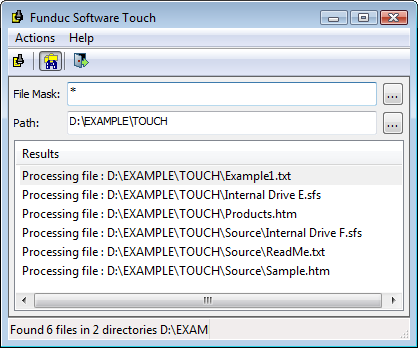
Additional screen shots of the program dialogs are available ...
Usage Notes:
-
The program GUI uses a date/time syntax matching the settings of your computer.
-
The command line always uses a "YYYY-MM-DD" and "HH:MM:SS" (24 hour time) syntax.
-
Back up your files before using the program for the first time.
-
The program F1 Hlp has additional usage guidelines. Be sure to read them before using the program.
-
It is up to the user to know what files on either a local or network drive are safe
to modify!! For example, changing file dates on file(s) directly related to your operating system or the operating system of a network drive may cause problems for your computer. If you are not sure of what you are doing do not proceed! -
FS Touch not intended for use on large NAS drive arrays in a server-based environment.
-
Care should be taken when modifying files on multi-platter NAS RAID drive arrays. The program has no logic whatsoever to identify RAID drive priorities and has no special knowledge of vendor specific storage manager software or network drivers. If you have files you must modify on a NAS RAID array consider temporarily copying them to a local standalone drive, using FS Touch, and copying them back to the NAS device afterward.
-
Test carefully when modifying files on single-drive home/consumer-oriented NAS devices.
-
In 'mirror / auto-backup' situations never modify the backup/secondary files, only deal with the primary drive being 'mirrored'.
-
Care is advised when using the program to modify file stamps on storage cards used in devices that expect might fixed file dates on 'system' related files (eg. cameras, music players, etc). Backup first when changing files on such media.
-
Never use FS Touch to modify file dates on smart phones or memory cards used in smart phones.
FS Touch Installers
Funduc_Software_Touch-Freeware-x64.exe (3.5 MB) - Self-installing version for 64-bit Windows. See Install & Uninstall Information for guidance about installation and removal. Download this and run 'Funduc_Software_Touch-Freeware-x64.exe' to install.
Additional Information
License Statement - See EULA Statement (End User License Agreement)