Search and Replace Regular Expression Wizard
 The Search and Replace Regular Expression Wizard is an application we made to help you create, understand, and debug Regular Expressions used by our Search and Replace, Replace Studio Pro, and Replace Studio Business Edition windows grep utilities.
The wizard allows you to construct new expressions, or modify existing ones, using a term-by-term approach. You can visualize the effect of each term in a sample text you can paste into the program from the windows clipboard or retrieve from a file on disk. The effect of specific terms is presented in-context, using colors to distinguish the current term from other parts of the overall expression. 'Search' and 'Replace' Expressions are constructed/ examined in separate screens of the Wizard so you can work on each part semi-independent of the other. You can move back & forth between the Wizard screens to make adjustments or experiment. The sample text can also be changed at any point by returning to the starting screen. When you are satisfied, the final expressions can be inserted automatically in the respective fields in the Search and Replace main program dialog (if Search and Replace is running).
Search and Replace Wizard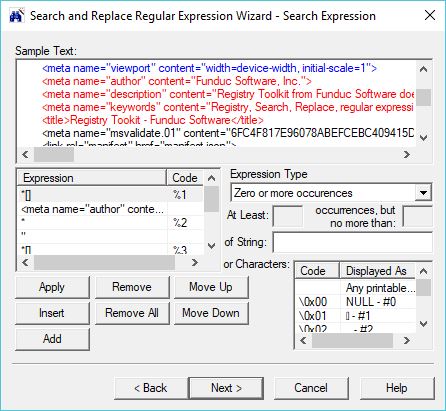
Visit Screen Shots for more sample screens ...
The Wizard is intended for both 'non-technical' and advanced users. If you are new to the regular expression syntax used by our programs the Wizard will may help you compose expressions. Advanced users will find the Wizard helpful for revising complex expressions. The real-time context highlight can be invaluable and the Wizard's Replacement Expression screen has a pick list that keeps track of '%n' replacement operators for you - no more counting up the ascii table when you have more than 9 wild card terms in your search string.
The Wizard's regular expression syntax rules are for Search and Replace version 4.0 and above. The program is a standalone app that does not require Search and Replace, Replace Studio Pro, or Replace Studio Business Editon.
The Wizard is a freeware program. A windows F1 help documentation file is available for either $10 (less for multiple copies) or for free as part of the license renewal for existing Search and Replace customers.
Search and Replace Wizard Installers
Search_and_Replace_RegEx_Wizard-Freeware_Installer.exe (3.4 MB) - This installs the 64-bit (x64) version. See Install & Uninstall Information for guidance about installation and removal. Download this to a temporary directory and run 'Search_and_Replace_RegEx_Wizard-Freeware_Installer.exe' to install.
Additional Information
License Statement - EULA Statements (End User License Agreement)
Purchase Now - https secure online registrations.