PowerPoint Search and Replace 1.0
PowerPoint Search and Replace is a freeware 'find and replace' macro for Microsoft PowerPoint similar to our freeware macros MS Word (Word SR) and MS Excel (Excel SR). PowerPoint Search and Replace macro uses PowerPoint's find and replace functions. The macro can process more than one file by specifying a 'wild card' in the dialog's 'File Mask (with path)' field.
Please look below for more information.
We also have counterpart macros for MS Word (Word SR) and MS Excel (Excel SR).
PowerPoint Search and Replace Dialog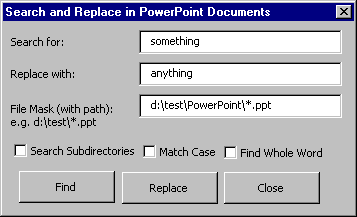
Important Notes
- PowerPoint Search and Replace is for Office 2000 and above.
- The 'PwrPtSR.ppt' is set up to automatically launch the macro when opened but this may not happen on your system. The file has some instructions to launch manually.
- PowerPoint Search and Replace requires that you have macro functioning turned on. You may need to enable macros in your Options settings.
- Scan 'PwrPtSR.ppt' with your anti-virus scanner before you open the file for the first time.
- The macro requires that you have the full version of PowerPoint installed. You can save the file as a PowerPoint slide show but it will not work if your machine has only the PowerPoint 'viewer' installed.
- PowerPoint Search and Replace can only process files understood by your PowerPoint installation.
- Back up your files first. Do NOT rely on the PowerPoint 'undo' function. The macro writes a file named 'PwrPtSR_Results.txt' in the same path that the operation is performed in. This file summarizes the search results or changes made. However, there is no built-in backup functionality.
- See the 'License' section in PwrPtSR.ppt for distribution information. You are free to modify the VBA code in the macro. If you like, send any changes you make to support@funduc.com. If your changes can benefit others we will add them to a new version. Thanks.
Version Information
- Version 1.0 - Initial release.
Download PwrPtSR
PwrPtSR.zip (Ver 1.0 - 50K) - Unzip this into the subdirectory of your choice. See 'readme.txt' for more information.
Additional Information
License Statement - See EULA Statement (End User License Agreement)